
For organizers
Feedback
Feedback is the written half of what attendees thought. It is only ever written by people who were actually in the room.
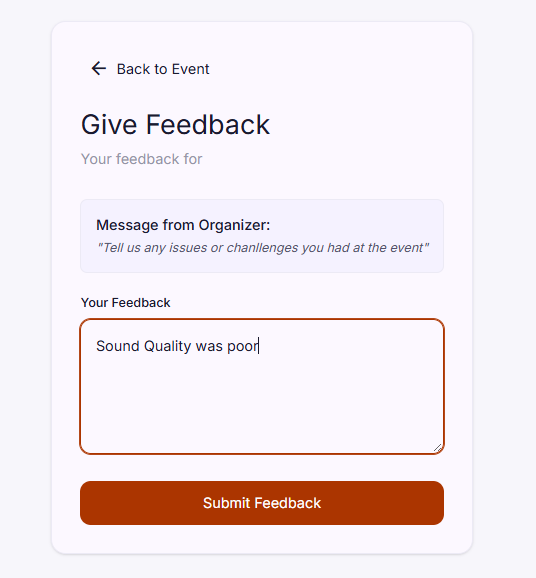
Only attendees verified by a QR scan can leave feedback.
Feedback is a form on the event page where verified attendees write what they thought. You ask the question, they answer it in their own words, and you read it afterwards.
Step 1: Turn on feedback
- Open the event and go to the feedback module.
- Enable feedback.
- Add an optional note, which is shown when people are asked for feedback.
- Set the end date.
The note is where you ask for something specific. “What should we change about the sound?” gets you more than “Any feedback?”.
After the end date, feedback is disabled and nobody can add any more.
Step 2: Collect it
Attendees write their feedback after the event. Nothing else on Evittone produces feedback.
Who can leave feedback
Only verified attendees. A person has to have been verified by a QR scan at the event before they can write anything, which is the same verification that unlocks ratings.
The five-minute window
A comment is editable for five minutes after it is sent, and only by the person who sent it. After that it stays exactly as written.
This catches typos. It does not let anyone rewrite the review after the fact.
Who can remove feedback
Other attendees can read feedback. They cannot report it.
Removal sits with you, the organizer. You can:
- Remove a comment that is abusive or targeted.
- Report a comment, so that the person who wrote it can be removed or restrained.
What attendees see
- Your optional note, as the prompt above the form.
- A box to write in, for the five minutes after they send.
- Everyone else’s feedback, as read-only. There is no comment box under feedback.
How to use it
- Read everything before you set the end date. Feedback after that date cannot be added.
- Sort by the common theme. Most event feedback repeats three or four complaints.
- Fix the top one before the next event. The point of collecting it is that the next event is different.
- Watch it alongside the ratings. A high rating with heavy written feedback is usually one specific thing.
Tips
- Ask one question, not five. You will get better answers and you will read them.
- Set the end date after the event, not a month later, while the feedback is still honest.
- Expect criticism. That is the feature working.
- Do not ask people to rate and write about something you have not fixed yet. It is the fastest way to teach attendees that neither matters.