
For organizers
Voting
Voting is how you find out what your people actually want, instead of guessing. Evittone has two versions of it, and they are not the same thing.
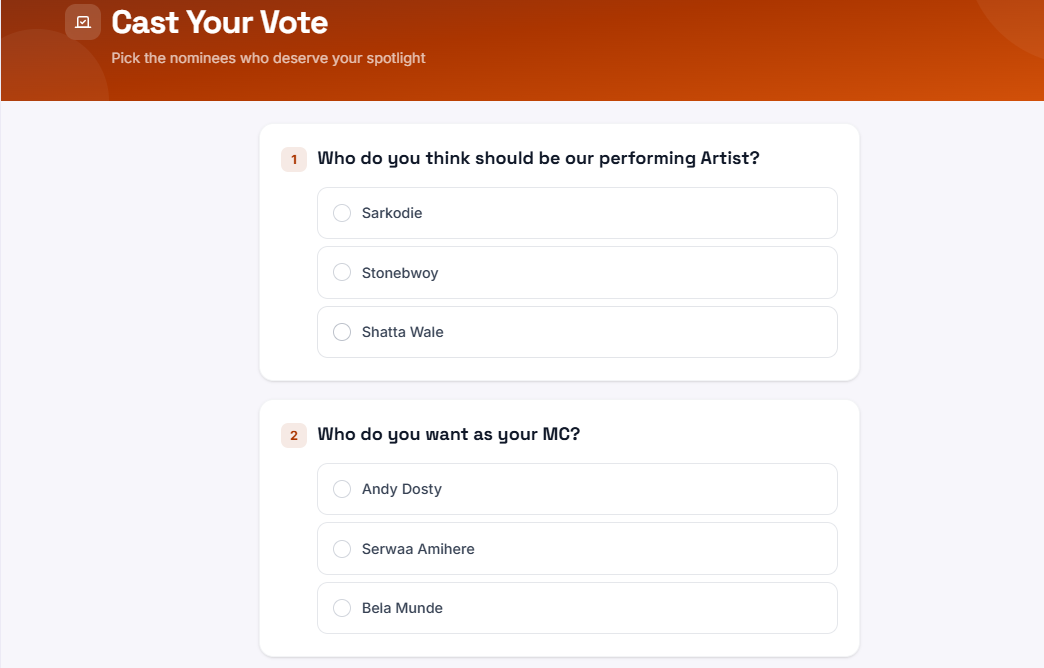
Nominations belong to advanced voting only. Simple voting has no nominees.
There are two kinds of vote on Evittone. Simple voting asks a question and counts the answers. Advanced voting runs the whole process: a nomination period, categories, and a priced vote.
Pick the one that matches the decision you are trying to make.
Which one do you need?
| You want to | Use |
|---|---|
| Ask people one question and see the split | Simple voting |
| Let people put names forward first | Advanced voting |
| Charge a fee per vote | Advanced voting |
| Let one person buy more than one vote | Advanced voting |
| Group the options into categories | Advanced voting |
| Ask for sign-in only | Either, both support it |
Simple voting
Simple voting is free, and each user gets one vote.
- Open the event and go to the voting module.
- Choose simple voting.
- Set the voting start date and time, and the voting end date and time.
- Add your questions, each with its options.
- Launch the vote.
The vote has to be launched before the event starts.
Why you would run it
The point of a simple vote is to learn what your attendees actually want, so you can plan the next one with evidence. For example, asking which artists to invite for the next edition.
Advanced voting
Advanced voting is the full process, in this order: nominations, then categories, then the vote.
- Open the event and go to the voting module.
- Choose advanced voting.
- Set the schedule: voting start and end, and nomination start and end.
- Turn on paid voting if each vote has a price.
- Turn on bulk voting if people can buy more than one vote.
- Choose whether nominations stay open while the voting is running.
- Choose whether sign-in is required for voters, and for nominees.
- Add your categories.
Categories in advanced voting
Each category holds:
- A name
- A description
- A price per vote
- A nomination fee
- The nominee fields: name, short answer, and picture
After you launch advanced voting
A nominations view shows the nominations and the categories, so you can see what has come in and how it is grouped.
What attendees see
Simple voting: your questions with their options, the start and end dates, and one vote each.
Advanced voting: the open nominations when nominations are running, the categories, and the vote when voting is running. If sign-in is required for voters, they are asked to sign in before they can vote. If it is required for nominees, they are asked to sign in before they can put a name forward.
Tips
- Launch simple voting early. It has to be running before the event starts, and people answer more of it when they have time.
- Use advanced voting only when the decision has real stakes. Nomination fees and per-vote prices are set by you, and people vote with their own money attached.
- If you do not need the answer publicly, keep it as a vote rather than a community post. Votes close on your schedule.
- Set nomination and voting dates that do not overlap unless you deliberately want nominations to stay open during the vote.